
NAVISTAR Window Sticker
Navistar International, a global leader based in Lisle, Illinois, is renowned for its commercial vehicles, including heavy-duty trucks, buses, and defense vehicles. When researching a used Navistar, ForCar.org allows you to easily access the original window sticker, also known as a Monroney Label, to uncover vital details like the manufacturer’s suggested retail price, detailed specifications, and crucial information about the vehicle’s performance and safety features. This original documentation provides a comprehensive overview of the vehicle’s history and features.
Enter VIN to Generate Window Sticker
Enter your 17-character VIN number to instantly retrieve the original window sticker (Monroney Label) for any NAVISTAR vehicle.
About Window Stickers
- Official Monroney Label document
- Required by federal law since 1958
- Contains MSRP and pricing details
- Shows fuel economy ratings (MPG)
- Includes safety ratings and features
NAVISTAR Information
- Brand: NAVISTAR
- Rating: ⭐ 4.7/5.0 (94 reviews)
- 52 models available
- Free window sticker lookup
- Instant Monroney label access
- All years and trims supported
What You'll Get
- Complete MSRP pricing breakdown
- Engine and transmission specs
- EPA fuel economy ratings
- Safety features and ratings
- Standard and optional equipment
Select NAVISTAR Model
NAVISTAR VIN Decoder — Free VIN Check Video Guide
Watch our quick NAVISTAR VIN decoder walkthrough. Learn how to decode any NAVISTAR VIN number to get full vehicle history, recall alerts, specifications, fuel economy (MPG), safety ratings, and known problems — completely free on ForCar.org.
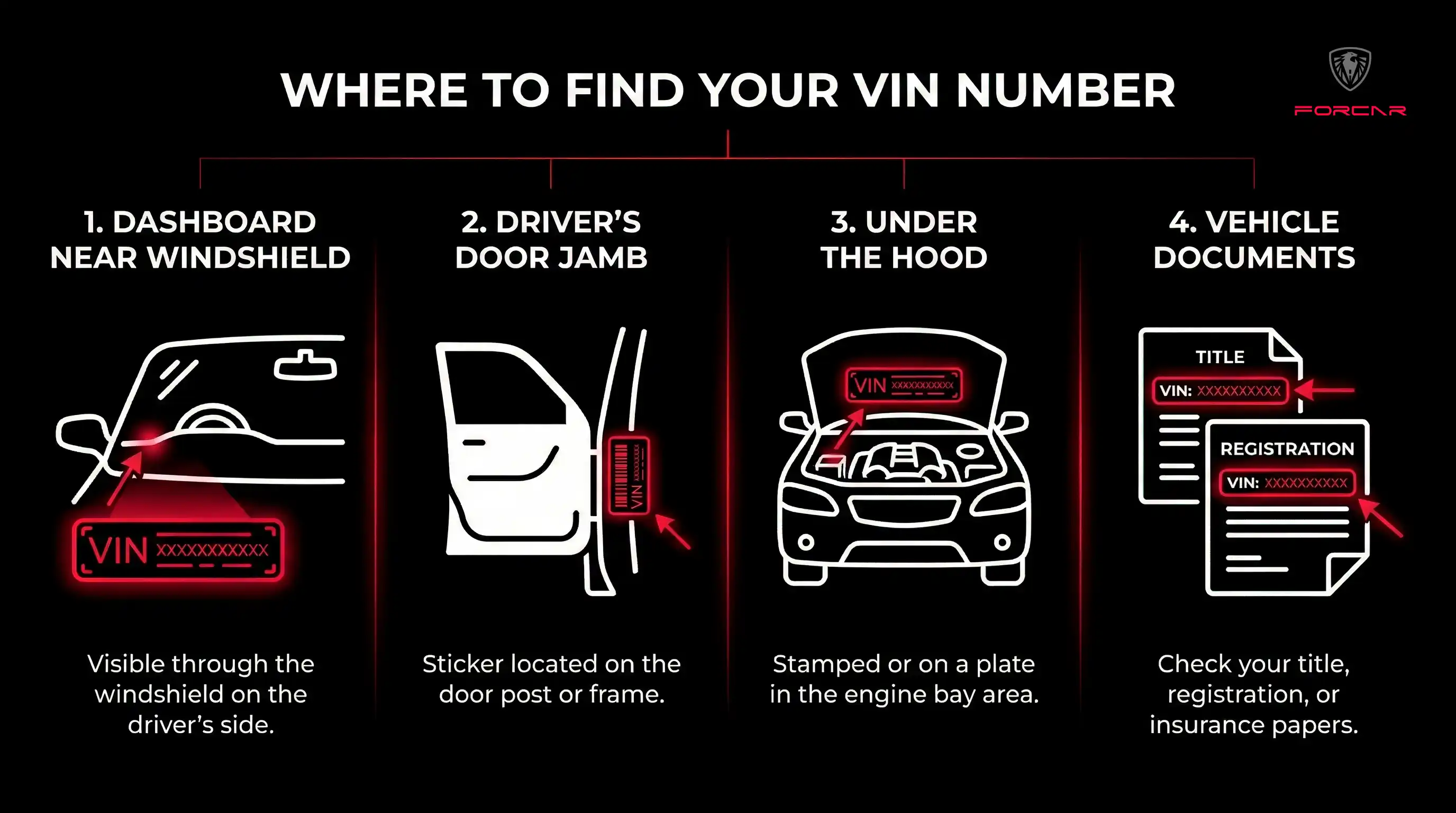
Where to Find VIN for NAVISTAR Window Sticker
To get your NAVISTAR window sticker, you'll need the 17-character Vehicle Identification Number (VIN). Here are all the common locations where you can find it on your vehicle:
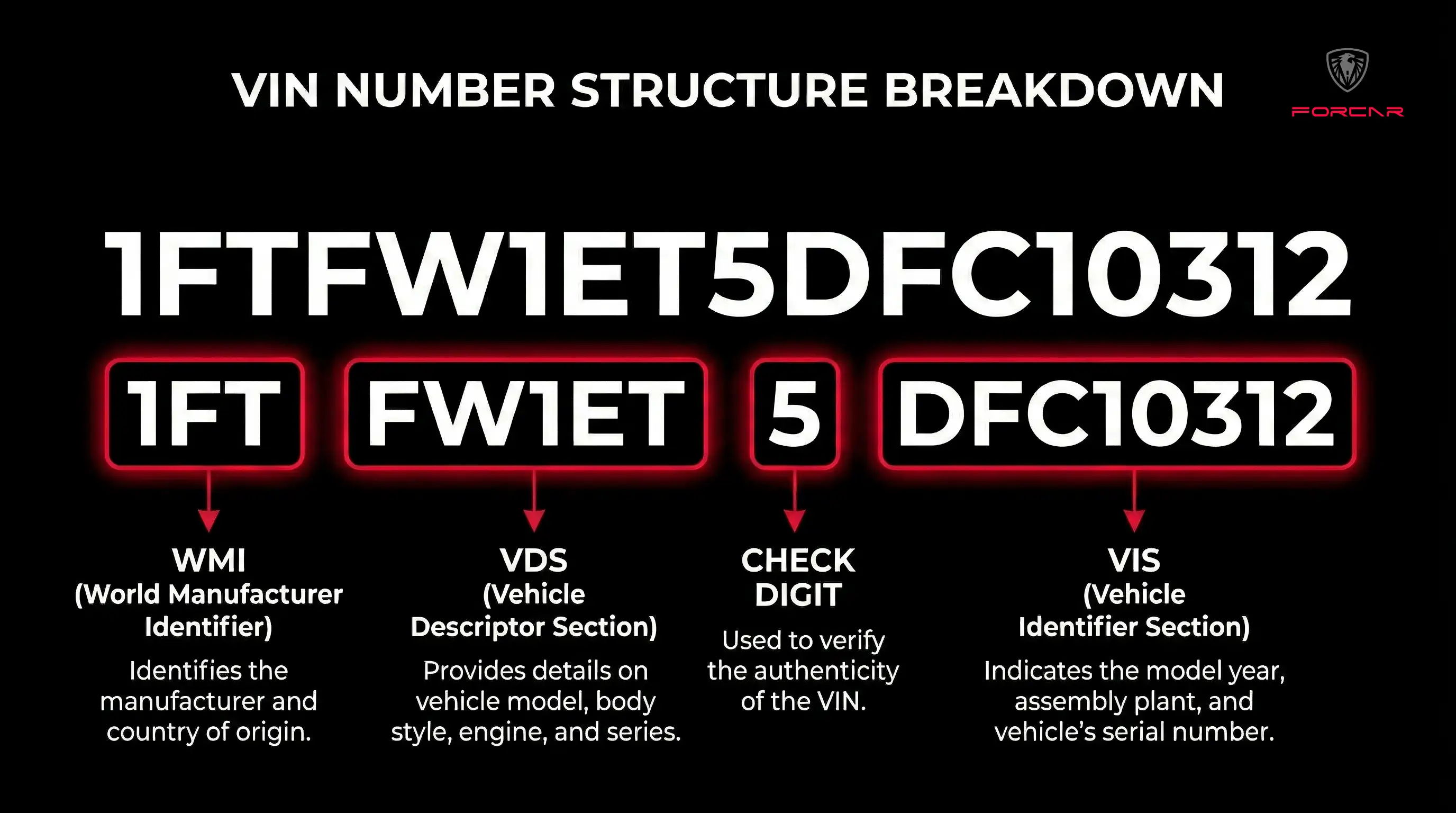
Understanding NAVISTAR VIN Structure
Each character in your NAVISTAR VIN has specific meaning. Understanding the VIN structure helps you verify the accuracy of your window sticker information:
How to Get Your NAVISTAR Window Sticker in 3 Steps
Locate Your VIN
Find your NAVISTAR VIN on the dashboard (visible through windshield), driver's door jamb sticker, engine bay, or vehicle documents like registration and insurance card.
Enter VIN
Input your 17-character NAVISTAR VIN into the lookup tool above. The system will validate the VIN format and retrieve your specific vehicle configuration.
Download Window Sticker
View and download your official NAVISTAR Monroney Label instantly. The window sticker includes MSRP, specifications, features, fuel economy, and safety ratings.
Frequently Asked Questions
How do I get a NAVISTAR window sticker by VIN?
To get your NAVISTAR window sticker, locate your 17-character VIN (on dashboard, door jamb, or documents), enter it in our lookup tool above, and instantly view or download your official Monroney Label with MSRP, specifications, and features.
Where can I find my NAVISTAR VIN number?
Your NAVISTAR VIN is located in 4 places: (1) Dashboard - visible through the windshield on the driver's side, (2) Driver's door jamb - on the door frame sticker, (3) Engine bay - stamped on the engine block or firewall, and (4) Vehicle documents - registration, insurance card, and title.
Is the window sticker lookup free for NAVISTAR?
Yes! Our NAVISTAR window sticker lookup is completely free. Enter your VIN to instantly access the official Monroney Label with no charges or subscriptions required.
What information is on a NAVISTAR window sticker?
A NAVISTAR window sticker (Monroney Label) includes: manufacturer's suggested retail price (MSRP), standard and optional equipment, engine and transmission specifications, EPA fuel economy ratings, safety ratings, warranty information, and country of origin.
Can I get a window sticker for any NAVISTAR model?
Yes! We support all 52 NAVISTAR models across all years and trims. Simply enter your VIN to retrieve the specific window sticker for your vehicle configuration.
What does the VIN structure reveal about my NAVISTAR?
Your NAVISTAR VIN structure reveals: World Manufacturer Identifier (characters 1-3), vehicle attributes like body type and engine (characters 4-8), check digit (character 9), model year (character 10), assembly plant (character 11), and unique serial number (characters 12-17).